4/8/18

Using New Angular6 Ng Update Feature

Everyone who using new angular knows that it depends on lot of packages - the @angular ones, rxjs, typescript and more. With so many dependencies- it might be hard job when trying to update, since some versions of some packages will not play with certain versions of other. (I call it dependency hell)


For solving this problem angular team added

ng update

command which should upgrade all the packages at once.
(Available from Angular CLI 1.7)

Experiment

Since it is interesting to play with new features, i decided to use this command for upgrading dependencies of one of my experimental projects. Its dependencies were like:

    "@angular/animations": "6.0.0-beta.7",
    "@angular/cdk": "6.0.0-beta.4",
    "@angular/common": "6.0.0-beta.7",
    "@angular/compiler": "6.0.0-beta.7",
    "@angular/core": "6.0.0-beta.7",
    "@angular/forms": "6.0.0-beta.7",
    "@angular/http": "6.0.0-beta.7",

And i expected that they will be upgraded to current 6.0.0-rc.3 version... After running command i got following message:
I guess that means the upgrade can be made only to stable version (not rc and not beta)

Well looks like angular guys still have some work to do...

3/20/18

Creating Javascript Router With Vanilla Javascript

What is router?
Router is a way to get different content in response to changes of url.
example:

That way it easy to memorize the url, and also you are able to navigate exact to product you need by the link (/vehicle/297 will lead you to SV650).
But what it means when speaking about JavaScript? Can JavaScript change the url without triggering full refresh of page?

Yes You Can

 It appears that javascript can change the url with HTML5 feature:

window.history.pushState("object or string", "sv650", "/sv650");


But How To Subscribe To Url Changes?

Yes, there is another HTML5 feature for it:
You can subscribe to 'pushstate' event:


window.addEventListener('popstate', (e) => {
  ...
});

Here is stackblitz project demonstrating routing in action

Summary

In this post you have learned that all 'Router' thing is actually very simple, and can be achieved with few pure javascript commands...
If you need more customizations like 'hash' Here is navigo vanilla javascript router...

2/21/18

How To Remove Property From Object Using ES6 Destructor

This trick i learned from Todd Motto`s grate ngrx tutorial:
Lets say you have javascript object like here:

  {
    "1": "koko",
    "2": "shoko"  
  }

And you need to remove only one property from it, say only the first one, which key is "1".
Yes, you can do it using old good "delete" command, but instead i recommend to take advantage of "ES6 destuctors" and spread
Destructors are way to set variables from existing object in one single command.
Spread command is for splitting the object (or array) properties to different variables.
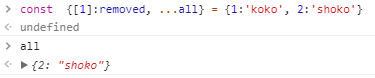
By combining those to ES6 features we can do the trick:
Which is much more nice

Getting started with docker

It is very simple to get started usig docker. All you need to do-is download the docker desktop for your system Once you get docker syste...