3/20/18

Creating Javascript Router With Vanilla Javascript

What is router?
Router is a way to get different content in response to changes of url.
example:

That way it easy to memorize the url, and also you are able to navigate exact to product you need by the link (/vehicle/297 will lead you to SV650).
But what it means when speaking about JavaScript? Can JavaScript change the url without triggering full refresh of page?

Yes You Can

 It appears that javascript can change the url with HTML5 feature:

window.history.pushState("object or string", "sv650", "/sv650");


But How To Subscribe To Url Changes?

Yes, there is another HTML5 feature for it:
You can subscribe to 'pushstate' event:


window.addEventListener('popstate', (e) => {
  ...
});

Here is stackblitz project demonstrating routing in action

Summary

In this post you have learned that all 'Router' thing is actually very simple, and can be achieved with few pure javascript commands...
If you need more customizations like 'hash' Here is navigo vanilla javascript router...

2/21/18

How To Remove Property From Object Using ES6 Destructor

This trick i learned from Todd Motto`s grate ngrx tutorial:
Lets say you have javascript object like here:

  {
    "1": "koko",
    "2": "shoko"  
  }

And you need to remove only one property from it, say only the first one, which key is "1".
Yes, you can do it using old good "delete" command, but instead i recommend to take advantage of "ES6 destuctors" and spread
Destructors are way to set variables from existing object in one single command.
Spread command is for splitting the object (or array) properties to different variables.
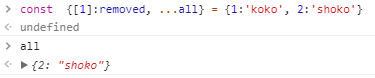
By combining those to ES6 features we can do the trick:
Which is much more nice

2/13/18

What Is This "Tap" Thing In Rxjs?

In the bank of Jordan river, in the Moab land, Moses wished to explain his testament to Sons of Israel and that`s what is he said:
I'm looking at great angular-ngrx-material-starter repo of great guy named Tom Trajan
And here is the code of "auth.effects" file, where you can clear see the usage of "tap" operator:

  @Effect({ dispatch: false })
  login(): Observable {
    return this.actions$
      .ofType(AuthActionTypes.LOGIN)
      .pipe(
        tap(action => // <-- code="" here="" isauthenticated:="" see="" tap="" the="" thing="" this.localstorageservice.setitem="" true="">
So what is this "tap"(lettable operator) thing doing???

Documentation

When looking into rxjs docs you can see that "tap" is newer version of "do" operator.
Also you can see following sentence: invokes an action upon graceful or exceptional termination of the observable sequence.
That means - if you want something to be done regardless of outcome of observable you can do it with "tap"

Example

All the places in he code which only taking care of storing the payload(and not trying to modify the outcome of observable ) in the localstorage making usage if "tap":

  @Effect({ dispatch: false })
  persistTodos(): Observable {
    return this.actions$
      .ofType(TodosActionTypes.PERSIST)
      .pipe(
        tap((action: ActionTodosPersist) =>
          this.localStorageService.setItem(TODOS_KEY, action.payload.todos)
        )
      );
  }

When observable outcome is somehow modified - the "map" operator comes to the stage:

  @Effect()
  loadPizzas$ = this.actions$.ofType(pizzaActions.LOAD_PIZZAS).pipe(
    switchMap(() => {
      return this.pizzaService
        .getPizzas()
        .pipe(
          map(pizzas => new pizzaActions.LoadPizzasSuccess(pizzas)),
          catchError(error => of(new pizzaActions.LoadPizzasFail(error)))
        );
    })
  );

Getting started with docker

It is very simple to get started usig docker. All you need to do-is download the docker desktop for your system Once you get docker syste...